Organizing your medical records isn't just about cleaning up a stack of papers. It’s about forging a clear, undeniable case for your VA claim. For veterans, I’ve seen time and time again how a well-structured file can be the single most important factor in preventing delays, overcoming denials, and ultimately, securing the benefits you rightfully earned.
Why Organized Records Are a Game Changer for Your VA Claim

Let's be honest—the VA claims process can feel like an uphill battle. You're dealing with complex forms, strict deadlines, and a bureaucracy that can feel impenetrable. In this fight, your medical file isn't just a pile of evidence; it's your most powerful weapon.
I remember working with a Marine veteran whose claim for tinnitus and hearing loss was stuck in limbo for over a year. His records were a mess—audiograms from a private ENT, a few scribbled notes from his time in service, and recent VA visit summaries were all thrown together. The VA reviewer simply couldn't connect the dots easily.
Once he took the time to sort everything chronologically and wrote a simple one-page summary, his claim was approved in a few months. This isn't a fluke. A disorganized file creates unnecessary work for the VA rater, which is a surefire recipe for delays or another dreaded request for information.
From Paper Chaos to Claim Clarity
A meticulously organized file does more than just get you a faster decision. It weaves together a clear, compelling story about your service-connected conditions. Think of it as telling your story in a language the VA understands, making it impossible to ignore. Every single document, from an old in-service injury report to a recent MRI, becomes a critical chapter.
Going through this process also gives you a profound sense of control. Instead of feeling like a victim of the system, you become the master of your own case. When you present a logical, easy-to-follow progression of your health issues, you make it simple for the adjudicator to draw a straight line from your military service to your current diagnoses.
The whole point is to make the service connection so obvious that a favorable decision is the only logical outcome. Your organized records build a bridge between your service and your current condition that the VA can easily cross.
This isn't about being a neat freak. Organizing your medical records is a strategic move. It shows you're serious, provides a complete picture, and leaves no room for doubt or misinterpretation. It ensures that every single relevant piece of your medical history is seen and considered, giving you the best possible shot at a successful claim and the peace of mind that you've built the strongest case you can.
Hunting Down Every Piece of Your Medical History
Think of this part of the process as an intelligence-gathering mission. Your goal is to track down every single document from every corner of your medical past. We're going far beyond just your service treatment records (STRs) here—we need to dig into every clinic, hospital, and specialist you’ve ever seen.
Your medical history isn't neatly filed in one place; it's scattered across dozens of systems and physical locations. You’ll need to put on your detective hat and request records from all of them:
- Military Treatment Facilities (MTFs) where you got care while on active duty.
- Private civilian doctors and specialists you visited, both during and after your service.
- All VA Medical Centers and any community care providers you were sent to.
- Specialized clinics for things like chiropractic care, physical therapy, or mental health counseling.
Seriously, don't overlook anything. A seemingly minor note from a physical therapist you saw years ago could be the exact evidence you need to connect your current back pain to an event that happened in service. And as you gather these files, especially digital ones, using effective PDF data extraction techniques can be a huge time-saver.
Navigating the Request Process
For every provider, you'll have to submit a formal request for your records. The go-to form for this is the DD Form 2870, "Authorization for Disclosure of Medical or Dental Information." Get familiar with it, because you'll need to fill one out for each and every facility.
When you fill it out, be specific. Don't just ask for "all my records." That's too broad and can slow things down. Instead, get precise: "all records related to my left knee from January 2010 to present, including all consultation notes, imaging reports (X-rays, MRIs), and surgical summaries." This kind of clarity helps the records department pull exactly what you need, often much faster.
Don’t get discouraged if a facility claims they've lost your records or if a doctor has long since retired. Persistence is everything. A week after you mail or fax your request, make a follow-up call. Confirm they got it and ask for an estimated timeline. Stay on them.
Tackling Common Retrieval Challenges
It happens all the time: a medical practice has closed its doors or your old doctor retired and moved to Florida. This is a common hurdle, but it's one you can clear.
- Closed Practices: When a practice closes, they don't just shred the files. The records are typically transferred to a custodian or a medical records storage company. Check the doctor’s old website (if it's still up) or contact your state’s medical board for information on who holds the records now.
- Retired Doctors: If the doctor was part of a larger medical group, the practice itself will still have your files. If they were a solo practitioner, they are legally required to make arrangements for patient records. Again, the state medical board is your best friend here.
This whole process of chasing down documents really shows you how critical it is to have easy access to your own information. It's such a big deal that the medical records retrieval market is a massive industry, valued at around USD 1.1 billion. It’s even expected to nearly triple by 2034, which just proves how vital this data is for patients and legal cases.
Alright, you've gathered a mountain of medical records. Now what? The next mission is turning that chaotic pile into a bulletproof system that works for you, your legal team, and most importantly, the VA. A shoebox full of papers just won't cut it when your benefits are on the line. We're going to build a hybrid physical and digital system that makes finding any record, from any date, dead simple.
Think of this as creating your own dedicated personal knowledge management system. It’s a highly structured library of your entire health history, built for one single purpose: to win your claim. The key is to create parallel systems—one physical, one digital—that mirror each other perfectly. If you can find a document in your binder, you should be able to find it on your computer in seconds.
The whole process can feel like a massive undertaking, but we can break it down into a simple, repeatable workflow.
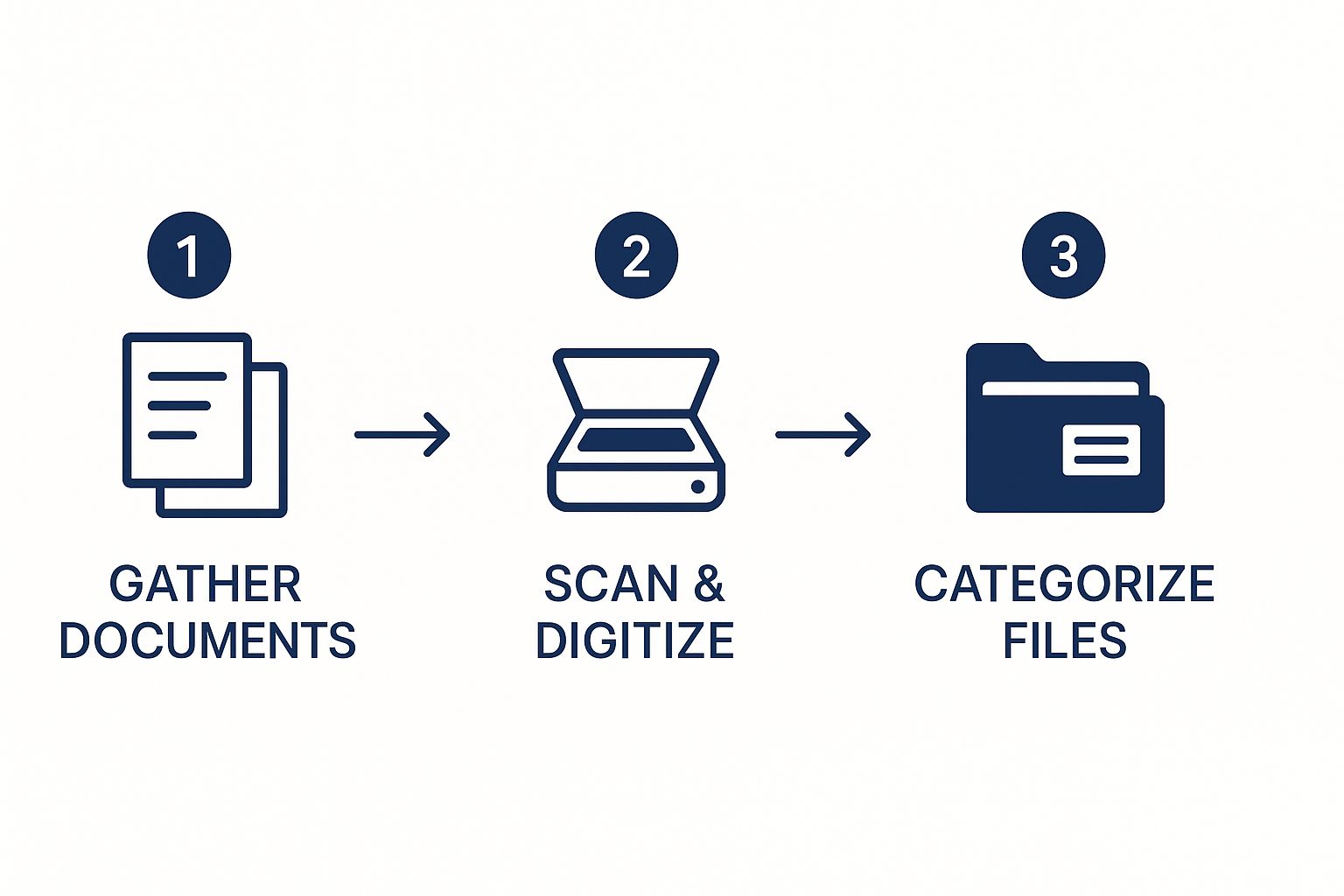
This is your new routine. Every single piece of paper you get from a doctor, the VA, or anywhere else goes through this flow: gather, digitize, and file. Stick to this, and you'll never lose control of your records again.
The Physical Binder: Your Go-To Field Manual
First, let's tackle the paper. Go get a sturdy 3-inch or 4-inch three-ring binder—you’ll need the space—and a set of heavy-duty divider tabs. This isn't just for storage; this is your grab-and-go evidence kit for C&P exams or meetings with your VSO.
I recommend starting with these tab categories. They create a logical story that's easy for anyone to follow:
- In-Service Records: This is ground zero. Put all your service treatment records (STRs), incident reports, sick call slips, and Line of Duty (LOD) investigations here.
- Post-Service Diagnoses: This section holds all the evidence from your civilian doctors that officially diagnose the conditions you're claiming.
- Buddy/Spouse Letters: This is where you'll keep signed statements from you, your spouse, friends, or fellow service members who can speak to how your condition affects you.
- VA Correspondence: Every single letter, decision, and appointment summary from the VA gets its own place here. Don't throw anything away.
This binder becomes your tangible, quick-reference field manual. You can flip to the exact page you need in an instant, which is invaluable when you're sitting across from an examiner.
The Digital Archive: Your Searchable Database
Now, let's build your digital fortress. This archive needs to be an exact copy of your physical binder's structure.
Start by creating a main folder on your computer or cloud drive (like Google Drive or Dropbox). Call it something clear, like "VA Claim Evidence." Inside that main folder, create subfolders with the exact same names as your binder tabs.
The real magic of the digital system, though, comes from a strict file naming convention. This is non-negotiable. Every single document you scan or download must be renamed immediately. A simple, powerful format is YYYY-MM-DD_Condition_RecordType.pdf.
For instance, an MRI report for your bad back from September 5, 2023, would be named: 2023-09-05_LowBack_MRI-Report.pdf. A buddy letter from John Smith about your tinnitus would be 2024-01-20_Tinnitus_BuddyLetter-Smith.pdf.
This one simple habit transforms a messy folder into a perfectly organized, searchable, and sortable database.
You don’t need a fancy office scanner. Your smartphone is more than capable. Use a free app like Adobe Scan or even the built-in Notes app on an iPhone to create clean, high-quality PDFs. The key is good lighting and making sure the text is crisp and readable. No blurry photos!
This hybrid approach truly gives you the best of both worlds: the security of a physical binder and the powerful convenience of a digital archive. This dual system is the foundation for staying organized for the long haul, ensuring you are always ready for whatever the VA claim process throws at you.
Using Digital Tools for Smarter Record Keeping

Let's be honest, technology is your best friend when it comes to keeping your medical records straight. Moving away from towering stacks of paper and embracing a digital system can turn a nightmare task into a powerful tool for your VA claim.
The single most important tool in your digital kit is the VA’s own patient portal, My HealtheVet. This isn't just another government website; it's your direct pipeline to your complete VA health history. Think of it as having instant access to lab results, appointment notes, and prescription details without ever having to mail a form or wait on hold.
Using the portal puts you back in the driver's seat. It dramatically reduces the time and frustration of requesting documents and lets you see your treatment history unfold in near real-time. That kind of clarity is gold when you're trying to communicate with your doctors and build a solid claim.
Getting the Most Out of Your VA Patient Portal
To really unlock the power of My HealtheVet, you need a Premium account. The upgrade is free and gives you full access to your health records. Once you have it, don't just look—download.
- Blue Button Reports: Look for the "Blue Button" feature. It lets you download detailed reports of your health data, and you can even set custom date ranges to pinpoint specific information.
- Secure Messaging: This is huge. You can talk directly with your care team through the portal. Every message you send becomes part of your official record, which can be critical evidence showing you reported symptoms or followed up on treatment.
- Download Regularly: Build a new habit. After every single VA appointment or test, log in. Grab the new visit summary or lab result right away and file it in your digital system.
When you actively manage your digital records, you're doing more than just collecting data. You're curating your own health story, making sure every single detail is captured, organized, and ready to go when you need it most.
The Bigger Picture: Electronic Health Records
This digital shift isn't just happening at the VA; it's the standard everywhere. Electronic Health Records (EHR) have completely changed how healthcare works. In the U.S., over 95% of hospitals are now on EHR systems, and it's making a real difference. For instance, this digital approach helps doctors save an average of 3.5 hours per week on paperwork, giving them more time for patients. You can get a deeper look at these numbers by reading the full analysis of EHR statistics.
What does this mean for you? It means that when you request records from your civilian doctors, they'll almost certainly arrive as digital files. This makes it incredibly easy to integrate them into the system you've already built.
As soon as you get those files, use your standard naming system (like YYYY-MM-DD_Condition_RecordType.pdf) and drop them into the right folder. By keeping your VA and private records consistent, you create a single, unified archive that's simple to search. The end result is less stress, better organization, and a much stronger case for your claim.
How to Maintain and Secure Your Medical Archive
You’ve put in the hard work to build your medical archive. That’s a huge win. But don't just stick it on a shelf and forget about it. Think of it less like a finished project and more like a living, breathing file that needs a little attention to stay useful for any future VA claims or legal matters.
What you've created is a powerful tool, but its value depends on keeping it current and secure.
The best way I’ve found to avoid another paperwork nightmare is to schedule a quick "records check-in" every three months. Just put it on your calendar. During that time, you'll simply file any new documents from recent doctor visits, lab results, or communications from the VA.
Pop the new papers into your binder and drop the digital copies into their corresponding folders. Make sure you stick to the naming system you already set up. This simple habit turns a mountain of a task into a quick, 15-minute job.
Protecting Your Physical and Digital Files
Now that you have this organized system, we need to talk about protecting it. All your effort is too important to lose to a simple accident like a spilled coffee or a hard drive failure. It's time to think about worst-case scenarios and plan for them.
-
For your paper files: Please don't just leave that binder on an open shelf. Go out and get a fireproof and waterproof document bag or safe. This is a small investment that provides incredible peace of mind, protecting your crucial original documents from the most common household disasters.
-
For your digital files: A single point of failure is your biggest enemy here. A crashed computer can erase everything in an instant. The gold standard is the “3-2-1 Backup” rule. This means you have three total copies of your data, on two different types of media, with one of those copies stored off-site. For example, keep one copy on your computer's hard drive, a second on an external hard drive you keep at home, and a third in a secure, encrypted cloud service.
Implementing solid cloud data loss prevention strategies is non-negotiable for protecting such sensitive information from being accidentally deleted or compromised. Services like Google Drive or Dropbox are good options, as long as you lock them down with strong, unique passwords and enable two-factor authentication.
Your medical archive is one of the most important assets you have, especially when you're in the middle of a claim. You need to protect it with the same level of seriousness you'd apply to your bank accounts. Your future self will be grateful you did.
The move to digital records isn't slowing down. The global Electronic Medical Records (EMR) market is expected to jump from USD 33.41 billion in 2025 to almost USD 50 billion by 2032. This trend is driven by tech that helps both doctors and patients, and you can discover more about the future of EMR technology to see where things are headed.
This shift is precisely why keeping your own secure, personal copy is so critical. By setting up a simple maintenance routine and properly securing your files, you ensure your archive is always ready and reliable when you need it most.
Tackling Common Questions About VA Medical Records
Even with the most organized binder or hard drive, you're bound to run into a few tricky situations. It’s just the nature of the VA claims process. From what I’ve seen helping countless veterans, a few specific questions come up time and time again. Let's walk through them.
"I Have Gaps in My Medical History. What Now?"
This is probably the most common hurdle veterans face. It's completely normal. Maybe you twisted an ankle in the field but never went to sick call, or you just pushed through the pain because that's what you were trained to do. Don't worry, this doesn't automatically sink your claim. It just means you have to get creative with your evidence.
This is where buddy letters and personal statements shift from being "nice-to-have" to absolutely critical. A detailed, signed statement from someone you served with who saw the incident or its aftermath can be incredibly persuasive. Your own statement, a sworn declaration, is just as important for filling in the blanks.
- Vague vs. Valuable: A letter just saying, "I remember he hurt his back," won't move the needle. But one that says, "In June 2005, during a field op at Camp Pendleton, I personally saw him fall off the back of a 7-ton. He was in obvious pain for weeks and couldn't carry his pack without help,"—that's the kind of detail that wins claims.
- Corroboration is Key: The goal is to build a consistent narrative. When multiple statements from different people describe the same event and its effects, it creates a powerful story that can bridge the gap left by missing official records.
"How Do I Prove My Current Condition is From My Service?"
This is the heart of it all. You have to establish what the VA calls a "nexus"—a clear, logical bridge connecting your current health problem to something that happened while you were in uniform. Your organized records are the foundation for building that bridge.
The single best tool for this is a nexus letter from a private medical professional. This isn't just a doctor's note. It's a formal medical opinion where a doctor states they've reviewed your service records and your current medical evidence and concludes that it is "at least as likely as not" that your service caused or aggravated your condition.
A well-written nexus letter can be the tipping point for a claim. It’s a medical expert doing the heavy lifting for the VA rater, explicitly connecting the dots in a way that’s hard to ignore. This piece of evidence is often worth its weight in gold.
"Are Digital Copies Okay, or Do I Need the Originals?"
For submitting your claim, yes, digital is perfectly fine. High-quality scans and digital photos are accepted by the VA, and uploading them directly through the VA's website is usually the fastest way to get your evidence into their hands. As long as every page is clear and legible, a digital copy is considered valid.
But—and this is a big but—you must keep the original paper documents. Never, ever throw away your originals. This is especially true for things like signed buddy letters, your DD214, or private medical opinions.
Think of it this way: your digital files are your working copies for submissions. Your physical papers are your permanent archive. Keep them safe in a fireproof, waterproof container. You never know when you might need them for an appeal or another legal matter where only an original will do.
At Homefront Group, we know this process is a marathon, not a sprint. Our team is made up of veterans and legal pros who have been in the trenches and understand these challenges firsthand. If you're feeling stuck or just need an experienced guide, take our 3-minute quiz to see how we can help you build your case and get the benefits you rightfully earned. Learn more and get started today.